.png)
.png)

Daniel Saks
Chief Executive Officer


Cold email still plays a major role in B2B outbound, but the workflow has become more technical. BDR teams now have to think about sender authentication, unsubscribe handling, domain reputation, list quality, and whether prospect data is accurate enough to support relevant outreach.
Google sender guidelines make authentication, sender reputation, message formatting, and unsubscribe handling central to inbox placement. Yahoo sender guidance also emphasizes timely, relevant email sent to active and engaged audiences. For commercial outreach, the CAN-SPAM guide outlines requirements such as accurate header information, clear identification, opt-out handling, and physical mailing address inclusion.
That means cold email tools should not be evaluated only by sequence builders or AI writing features. BDR teams also need clean account lists, usable contact data, reliable sending workflows, and clear paths into CRM. A tool can manage the campaign, but it cannot fix a poorly targeted list after the fact.
This guide reviews cold email tools for BDR teams in 2026. The list focuses on sending workflows, deliverability support, sequencing, reply management, CRM fit, and how teams prepare campaign-ready audience data.
Cold email tools help BDR teams manage outbound email campaigns, but they do not all solve the same problem. Some are built for high-volume sending. Others focus on sales engagement, mailbox rotation, deliverability testing, or all-in-one prospecting.
A practical cold email workflow usually includes:
The most important point is sequence order. List quality comes before deliverability checks. Deliverability comes before volume. Message relevance comes before scaling. If the first step is weak, the rest of the workflow becomes harder to fix.
Primary Use Case: Technical GTM teams, RevOps teams, BDR operations teams, and AI agents that need structured audience data before cold email campaigns are launched.
Plan Details: Contact Landbase for tailored pricing details.
Landbase CLI is a terminal-native interface for working with B2B audience data. It helps teams prepare cold email inputs from the command line, Claude Code, Codex, scripts, dashboards, and other technical environments.
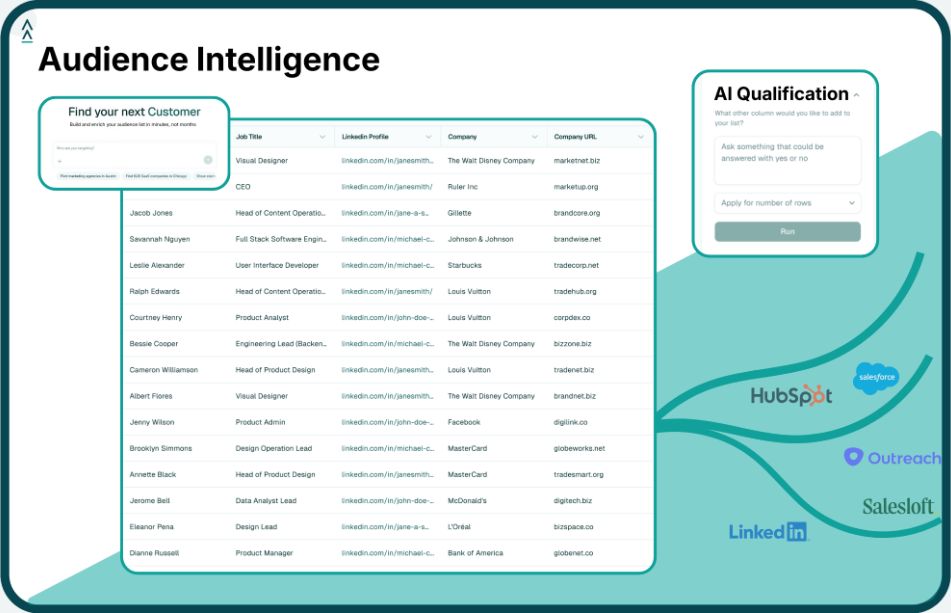
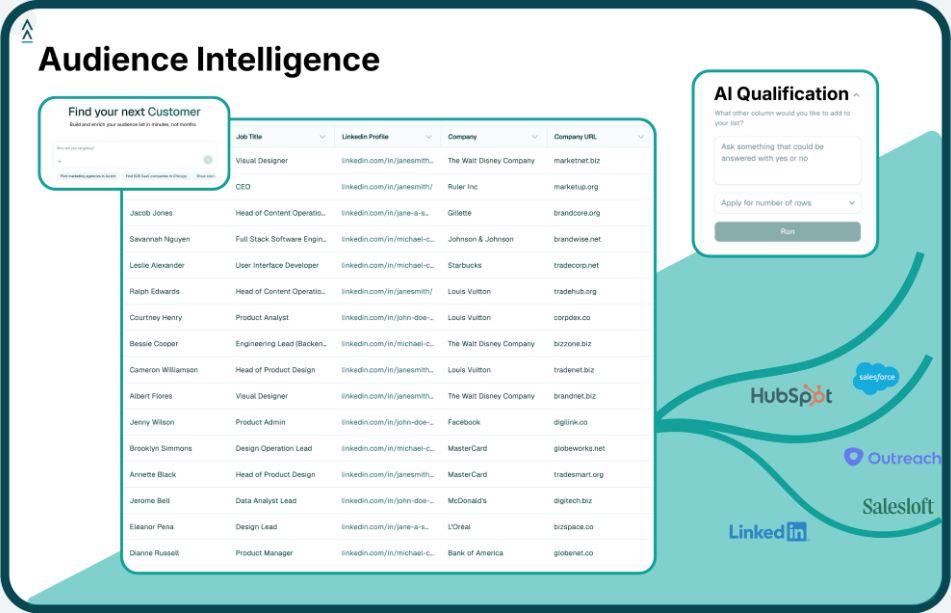
Cold email platforms handle sending. Landbase helps with the work that comes first: identifying the right audience, improving contact and company records, resolving messy list inputs, and exporting campaign-ready data.
Landbase CLI is included because cold email outcomes depend heavily on the quality of the audience. A sending platform can rotate inboxes, manage sequences, and organize replies, but it still needs accurate account and contact data to work with.
With Landbase CLI, BDR operations teams can turn campaign criteria into cleaner inputs before records enter a cold email tool. A team can define the market, prepare the list, enrich the data, resolve partial records, and export files for the next system in the workflow.
This is especially useful for RevOps teams, GTM engineers, and technical founders that want repeatable cold email preparation workflows instead of one-off spreadsheet pulls. Landbase turns upstream list building into a structured data process that can connect with CRM, outbound tools, analytics, and AI-assisted workflows.
Primary Use Case: Teams that need cold email campaign management, mailbox connections, and sending workflows.
Instantly.ai is used for cold email campaign setup, mailbox management, email warmup, lead organization, and reply handling. Its workflow is built around managing outbound email campaigns across connected sending accounts.
High-volume cold email teams often need infrastructure for account management and campaign control. This tool is included because it supports the sending layer of outbound email, especially when teams manage several inboxes and need centralized campaign visibility.
Primary Use Case: Teams that want cold email sending infrastructure, mailbox management, and deliverability-related controls.
Smartlead supports cold email workflows with mailbox connections, warmup, campaign management, reply handling, and features related to deliverability monitoring. It is often evaluated by teams sending outbound campaigns across multiple inboxes.
This option is included for teams that need more control over the sending setup. When cold email operations involve several domains, inboxes, or client accounts, deliverability-related tooling and centralized management become important parts of the workflow.
Primary Use Case: Teams that want prospecting data, email sequencing, calling, and CRM sync in one workspace.
Apollo.io combines company search, contact search, enrichment, outbound email sequences, calling tools, and CRM sync. It is commonly used by teams that want prospect discovery and engagement workflows in the same platform.
For teams that prefer fewer systems, an all-in-one workspace can reduce handoffs between prospecting and outreach. This makes the tool relevant when BDRs need to move from list creation to sequencing without managing several separate products.
Primary Use Case: Teams that want cold email campaigns with personalization and multichannel outreach support.
Lemlist supports email campaigns, personalization features, follow-up workflows, LinkedIn-related actions, and deliverability tools. It is often evaluated by teams that want more control over how outbound messages are personalized.
This entry fits teams that want message personalization to be part of the cold email workflow. It can support campaigns where reps need more than a static text sequence and want personalization elements connected to outbound sending.
Primary Use Case: Teams that want cold email sequences, inbox management, and lead workflows in one platform.
Saleshandy supports cold email campaign creation, sender rotation, email warmup, lead management, and reply tracking. It is commonly evaluated by smaller teams and agencies that want a sending workflow with list and campaign management features.
For teams that want a practical campaign management setup without a complex sales engagement stack, this tool can support the core cold email workflow. It is most relevant when teams need to manage sequences, replies, and sending accounts in one place.
Primary Use Case: Sales teams that want cold email sequences, multichannel engagement, CRM sync, and reply handling.
Reply.io supports outbound workflows across email and other channels, with sequencing, CRM integrations, task management, and reply handling. It is often used when cold email is part of a broader sales engagement process.
Cold email often turns into tasks, calls, social touches, and CRM updates. This option belongs in the list because it supports email as part of a larger engagement workflow rather than treating campaigns as isolated sends.
Primary Use Case: Teams that want simple cold email campaigns, follow-ups, and reply detection.
Woodpecker focuses on cold email sequencing, follow-up logic, mailbox connections, and response management. It is often considered by teams that want a straightforward sending workflow without adding a broader sales engagement platform.
This tool is included for teams that want a focused cold email workflow. It can support BDRs that need a simpler way to manage outreach, follow-ups, and replies without moving into a heavier sales engagement system.
Primary Use Case: Teams that want email finding, verification, and cold email campaign sending in one workflow.
Hunter Campaigns connects email search and verification with basic cold email sending. It is commonly used by teams that need to find contacts, verify addresses, and launch straightforward outbound campaigns.
This option is included for teams that want the find, verify, and send steps close together. It can support smaller BDR teams that need a simple path from contact discovery to outbound email.
Primary Use Case: BDR teams that want cold email sequencing with phone and social follow-up options.
Mailshake supports cold email campaigns, follow-up sequences, reply management, and sales engagement workflows that can include phone and social touches. It is often evaluated by teams that want email-first outbound with additional follow-up channels.
Email-first teams sometimes need follow-up channels without adopting a full enterprise engagement platform. This tool is relevant when BDRs want cold email sequences connected with phone or social actions.
Cold email performance starts before the sending tool opens. The list has to match the campaign, the contacts need to be usable, and the data has to move cleanly into the next system. Landbase CLI supports that preparation layer for BDR teams and GTM operators.
Teams can use Landbase CLI to prepare campaign inputs in several ways:
This gives technical teams more control over the upstream data layer. Instead of asking a cold email tool to compensate for broad or messy lists, teams can build cleaner inputs first and route them into the right campaign system.
For cold email teams, the value is in preparing the list before it reaches the sending platform. Landbase CLI can help operators define the audience, enrich missing fields, clean uploaded records, and export campaign-ready files for the next step in the outbound workflow.
Teams building repeatable outbound processes can review what Landbase CLI can do, explore B2B list building, or connect with Landbase through the demo page.
List quality affects whether a campaign reaches relevant prospects and whether the contact data is usable. Poor lists can lead to bounced emails, low engagement, irrelevant messaging, and messy CRM records. Even a strong cold email platform cannot fix broad targeting or inaccurate contact data after the campaign starts. Tools like Landbase CLI help teams prepare targeted, enriched audiences before those records move into cold email platforms.
Landbase CLI supports cold email workflows by helping teams prepare the audience data behind each campaign. Teams can search for target accounts, enrich contacts, match uploaded records, manage datasets, and export structured files for CRM or sending tools. This gives BDR operations and RevOps teams more control over the data before outreach begins. Instead of uploading a generic list, teams can route cleaner campaign inputs into the cold email platform they already use.
BDR teams should evaluate mailbox management, sequence creation, sender rotation, warmup support, reply handling, email verification, CRM integrations, and pricing structure. The right tool should match the team’s sending volume, workflow complexity, and handoff requirements. Teams should also review how easy it is to manage replies and route qualified prospects into CRM. Just as important, they should consider how prospect lists are created before they are uploaded into the tool.
A cold email platform manages sending, sequencing, follow-ups, and replies. Landbase CLI helps prepare the audience data behind the campaign before that data reaches the sending tool. It supports list building, enrichment, record matching, dataset management, and structured exports. This makes it useful for teams that want cleaner inputs feeding into cold email, CRM, analytics, or AI-assisted workflows.
Cold email tools can improve outbound execution by organizing sequences, follow-ups, sender accounts, and replies. They can also help teams manage deliverability-related tasks such as account setup, warmup, verification, and sender rotation. However, performance still depends on the quality of the audience, relevance of the message, deliverability setup, and response handling. Strong campaign results usually come from combining a reliable sending workflow with accurate, well-prepared prospect data.
Tool and strategies modern teams need to help their companies grow.